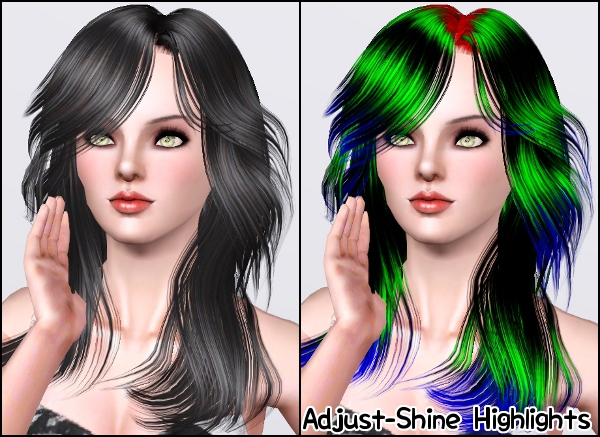
Peggy Hair 742 ~ Pooklet'd for all ages

Hi! I'm in love with this new hair by Peggy! It looks great, the animation is horrible but hell, is cute! XD

~ This retexture works for all ages. Adult is #742 and Child/Toddler #741
~ This hair comes in two versions: EA's highlights and Adjust-Shine Highlights. You can only have one version!

Happy Simming! ^-^

(Click the pictures to enlarge)


~ Adjust-Shine Higlights ~


- I Don't Take Any Credit of The Mesh Itself.
- Please, don't redistribute. Give credit to Peggy and to me.
- Original hair by Peggy

__________________________________________________


DOWNLOAD!

EA's Highlights

Adult
Mediafire // zShare

Child and Toddler
_________________________

Adjust-Shine Highlights

Adult
Mediafire // zShare 

Child and Toddler 

__________________________________________________

Model credits:
~ Skintones by Aikea / LemonLeaf / 234jiao / Ephemera
~ Eyes by LemonLeaf / ImminentFate / -Shady-
~ Lipsticks, blushes and eyeliner by LemonLeaf
~ Eyeshadows by LadyFrontbum
~ Eyebrows by daluved1 / Jessica_2020
~ Flower headband by Me
~ Flower necklace by LemonLeaf
~ Clothes by The Sims 3 Generations / The Store

NewSea's SailAway Female Hairstyle ~ Pooklet'd for all ages

Hi! Another NewSea hair, yes I know, but they make such beautiful hair meshes I cannot resist! :P

~ This retexture works for all ages.
~ Hair mesh polycount: 12000+ polys for High Quality, 5000+ polys for Low Quality (mid high)
~ This hair comes in two versions: EA's highlights and Adjust-Shine Highlights. You can only have one version!
~ MESH IS NOT INCLUDED! You can get it here (or here)
~ Hair retextured with NewSea's permission.

Have fun! ^-^

(Click the pictures to enlarge)


- I Don't Take Any Credit of The Mesh Itself.
- Please, don't redistribute. Give credit to NewSea and to me.
- Original hair by NewSea
- MESH IS NOT INCLUDED! You can get it here (or here)
- How to install? Extract the files into your Mods/Packages folder. If that doesn't work, please follow these instructions. 
- Would you like to have one file instead of two to use this retexture? Please, follow this easy tutorial.

__________________________________________________

DOWNLOAD!

EA's Highlights

Adult
Mediafire // zShare

Child and Toddler
_________________________

Adjust-Shine Highlights

Adult
Mediafire // zShare 

Child and Toddler 

__________________________________________________


Model credits:
~ Skintones by Aikea / LemonLeaf / 234jiao / Ephemera
~ Eyes by LemonLeaf / ImminentFate / -Shady-
~ Lipsticks, blushes and eyeliner by LemonLeaf
~ Eyeshadows by LadyFrontbum
~ Eyebrows by daluved1 / Jessica_2020
~ Flower headband by Me
~ Flower necklace by LemonLeaf
~ Clothes by The Sims 3 Generations / The Store

NewSea's BabyFace Female Hairstyle ~ Pooklet'd for all ages

Hi! I'm thrilled by this hair, I feel like it's one of my best retextures! Of course, all the credit to NewSea and their wonderful done meshes, seriously, those guys have real talent!

~ This retexture works for all ages.
~ Hair mesh polycount: 12000+ polys for High Quality, 5000+ polys for Low Quality (mid high)
~ This hair comes in two versions: EA's highlights and Adjust-Shine Highlights. You can only have one version!
~ MESH IS NOT INCLUDED! You can get it here (or here)
~ Hair retextured with NewSea's permission.

Enjoy! ^-^
(Click the pictures to enlarge)


~ Adjust-Shine Highlights ~


- I Don't Take Any Credit of The Mesh Itself.
- Please, don't redistribute. Give credit to NewSea and to me.
- Original hair by NewSea
- MESH IS NOT INCLUDED! You can get it here (or here)
- How to install? Extract the files into your Mods/Packages folder. If that doesn't work, please follow these instructions.

__________________________________________________

DOWNLOAD!


EA's Highlights

Adult
Mediafire // zShare

Child and Toddler
_________________________

Adjust-Shine Highlights

Adult
Mediafire // zShare 

Child and Toddler 

__________________________________________________

Model credits:
~ Skintones by Aikea / LemonLeaf / 234jiao / Ephemera
~ Eyes by LemonLeaf / ImminentFate / -Shady-
~ Lipsticks, blushes and eyeliner by LemonLeaf
~ Eyeshadows by LadyFrontbum
~ Eyebrows by daluved1 / Jessica_2020
~ Flower headband by Me
~ Flower necklace by LemonLeaf
~ Clothes by The Sims 3 Generations / The Store

EA's Highlights VS Adjust-Shine Highlights ~ All you need to know!

Have you ever wondered what is the difference between EA's Highlights and Adjust-Shine Highlights? Well is time for my to explain that the best I can! And with pictures of course :D

First of all, what are higlights?

Highlights can be changed on the hair section of your CAS screen. They appear as fine lines across your base color, the third button from the top.


EA's Highlights

This type of highlights is used by EA on their meshes, these are streaks along the hair that you may use to add more deepness to the texture.

(Hair by Rose)

As you can see on the picture, the green streaks are the highlights used for this method. To get the best result, use light colors on dark hairs like black, brown or ginger, and dark colors for light colored hairs, like blonde for example. This way, you'll add deepness to the hair. It may take some time to use it correctly but the results are fantastic!

Other examples of hairs using "EA's Highlights"

(Hairs by Peggy, NewSea and Cazy)


Adjust-Shine Highlights

This type of highlights is used by several creators such as Peggy, NewSea, Rose, TumTum and many others. With this method, you are able to change the color of the area of the hair where it is supposed to shine. Let's see an example:

(Hair by Peggy)

You may notice how the green areas on the right picture match the white/gray areas on the left picture. That means you can use any color to choose how shiny you want your hair. This method tends to make hairs more realistic and shiny looking, in comparison of "EA's Highlights". You have to pick a color that is lighter than the base color of your hair, for example: if you hair is brown, pick the same color for the highlights and then make it lighter, whiter looking.

Other examples of hairs using "Adjust-Shine Highlights"

(Hairs by NewSea, aWT and Peggy)


EA's Highlights VS Adjust-Shine Highlights

Can't you tell the difference yet? These pictures may help you:

(both EA's and Adjust-Shine are using the same color on each comparison picture)


But... but! What is better? What should I be getting? Help!! :(

I'm afraid I can't choose for you. You have to make your own decision, test both versions and keep whatever you like more! :D

_________________________________


And here ends this... um... tutorial? XD 
I hope this clears any doubt you might have! Don't be afraid to ask! ^-^

Related Posts Plugin for WordPress, Blogger...